Sign-ups and payments
Open public sign-ups, take money by card or in person, and let confirmations send themselves.
Connect payments
SetRally charges through Stripe, and the money goes straight into your club’s account — never through ours. The first time, the console walks you to Stripe to create or link the club’s account: identity, bank account, a few minutes. From then on, every registration payment lands with you, and receipts go out on their own. Players pay without leaving SetRally: Stripe’s payment form shows inside the sign-up page (and in their receipt, or a teammate’s payment link), and card numbers go straight to Stripe.
If Stripe later asks for a document or a detail, a banner with the deadline appears in your console — settle it before the date and payments never pause. You can also open sign-ups without Stripe and take everything in person.
Configure sign-up
The fee. Per player, or per team for doubles and team play — your choice, division by division. The form shows the exact price before asking for anything. You can also offer several named prices, up to eight — Member, Non-member, Junior, half season… — and each person picks theirs when signing up; 0 makes a free price beside the paid ones — for a tournament on the Free plan, the console reminds you under the prices that it then keeps its limits (see Plan). A price can have its own spots: once full, it opens its own waitlist while the others stay open; without spots, it draws on the event’s. The public page quotes “from” the lowest paid price.
The spots. On the Free plan the event itself is capped at 16 players, held seats included, except a session, which has no cap. For a tournament, the cap falls when every sign-up is paid online through SetRally, with no $0 price or division, or when you unlocked it (see Plan); a league keeps it until the Club plan. Set a capacity per division if your gym has a limit. A spot is held the moment someone starts paying — no overselling while two people hesitate over the same last place. Division full? The form offers Join the waitlist: the person gets “You’re on the waitlist” and sits under that tag in your entrants tab. When a spot frees up, the tab says so and Give them a place offers it; an “A place opened up” email then invites them to finish signing up. A session doesn’t wait for you: it offers the spot to the first person on the list by itself (chapter 3). On the Free plan it is the ceiling of 16 players per event that closes the form, whatever the capacity — see your subscription. The same ceiling holds for players you add yourself in the console, and for a waiting sign-up you give its place to.
The official level, if you ask for it. With a level system and Ask for the level at sign-up, the form asks each player’s level — Elite, A, B or C, in one tap, always optional. When the check is on, each division states its rule (“up to B”), and a declared level above it is flagged at once, with a button to switch to the division that takes it. Depending on your setting, the sign-up goes through with a warning or is refused — before any payment, never after. You then see “Declared at sign-up” beside the level, and the value you enter in the console has the last word.
Open. One switch, and the sign-up page is live: app.setrally.com/your-club/your-event/register. Copy the link or show its QR code — that’s what goes in the WhatsApp group, the season-opening email, or the poster on the board.
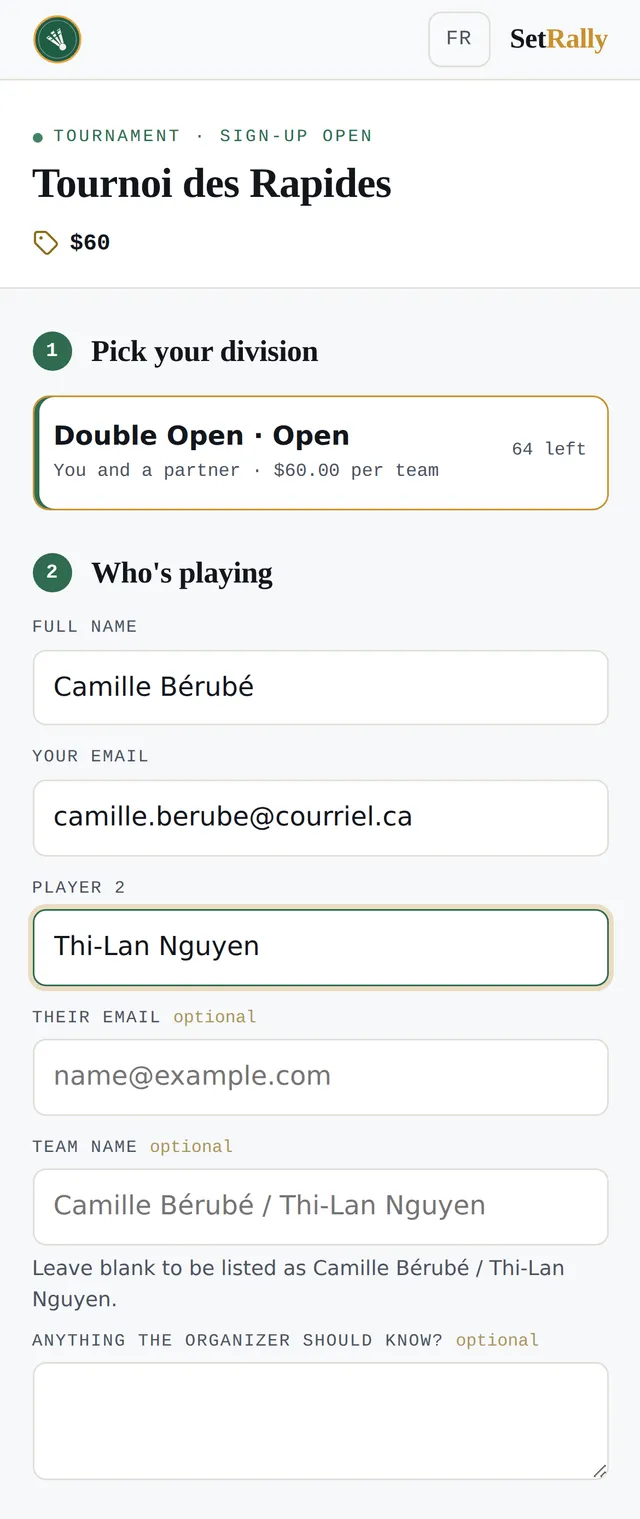
For a session, the sign-up page opens on a summary of the session, with its thumbnail, title, date, place and price, and folds your description under Session details: the player, who just read it on the session’s page, finds the fields on the first screen.
Under the submit button, the form tells players what their email is for — their registration and the event’s messages, never advertising —, that their names and results appear on the public pages and feed players’ history and rating, and that a player under 14 is signed up by a parent or guardian, from their own account; with links to SetRally’s terms of use and privacy policy. The terms you write for your own sign-ups stay separate: they are yours. The same link sits at the foot of every public page and every email sent on your club’s behalf — the only place a player you added yourself will see it.
An account to sign up
Every sign-up is made with a SetRally account, with no password. Divisions, prices, dates and your description stay visible to everyone; when it comes to who is playing, the form asks the person to sign in, with a link sent by email or with Google. Inside Messenger’s, Facebook’s or Instagram’s browser, where Google refuses to sign anyone in, the form offers email alone. The link brings the person back to the sign-up they had started, with their division and price. The first time, they accept SetRally’s terms of use and privacy policy and declare they are 14 or older.
Signed in, the person types neither their name nor their email: the first player is them, under their account’s address. Their first sign-up with you links their record in your group to their SetRally account — the record you keep, and still see and fix as before. Teammates need no account: a name, an optional email, and their pay link by email.
For someone else. A parent signing up their child, or a captain who doesn’t play, taps Not playing yourself? Sign someone else up and gives the person’s name alone — and their own, if their account has none yet. SetRally makes the person a record under that name, with no address and linked to no account; the sign-up’s emails go to whoever made it, and it shows on their My groups page. On a session paid online, the person signing up also has their own record in your group, made and linked to their account at that moment if they had none: that is where the credit goes. They can pay for the sign-up with their credit with you, and if it is cancelled in time, everything paid comes back to their credit, not the child’s. If you cancel it yourself from the console, Cancel and credit credits them, and the confirmation names them.
The links that follow — receipt, paying a share, attendance replies, check-in, scores — still work without signing in. Nothing changes in your console either: a player you add yourself needs no account.
Doubles and teams
For doubles, one person signs the pair up and chooses: pay the whole fee, or “Just my share”. In the second case, each teammate gets their own payment link by email for their share. The registration is confirmed when the last share settles — and the captain can always see who has paid and who’s dragging their feet.
In a gendered division — men’s or women’s singles or doubles, mixed doubles — the form requires each player’s gender, Man or Woman, and refuses a sign-up the division cannot seat: a man in women’s singles, two women in mixed doubles. It says so as soon as the genders chosen don’t fit, before sending and before any payment, with a button to switch to a division that takes them when there is one. A plain Singles or Doubles division asks nothing. When you place entrants yourself, gender is required only if all your divisions are gendered. On the Players tab, each player’s card shows their gender, which you correct in one tap (M, W or —); the line only appears when the event has a gendered division.
In a team league, the captain signs the club up with the players they have, and the form asks each one’s gender, Man or Woman: the league uses it for men’s, women’s and mixed matches. It is optional, even when the league refuses an illegal lineup: nothing is blocked for an unknown gender, and it can be filled in on Teams, where you can also enter the roster yourself. In both cases, the form never replaces a gender already on file.
Taking money in person
Cash is still king in gyms. On a registration’s card, mark a payment as received in person — the spot is confirmed as if the card had gone through. You can also waive someone (the coach, the volunteer who puts up the nets): their registration is complete, with no amount owed.
Confirmations and receipts
The moment a registration comes in, the person gets an email with their manage link — their way back to their own registration, even if they close the tab thirty seconds after paying. When everything is settled, a second email confirms it: “you’re in”. Both go out in your club’s name (“Your club via SetRally”), not ours.
A sign-up made with an account shows at once on the person’s My groups page, with its dates and state. Under the receipt of a sign-up made before an account was required, SetRally offers the person to create their account with the same address: it picks up that sign-up, and the next one takes no retyping. Nothing changes for you: you still see only the record you keep, never what other groups know about the person. In their SetRally account, the person sees that record as their account with you. A public form no longer matches by name someone who gives their address: an address you don’t know yet creates a new record, which you can fix from your entrants.
Fix a name
A name typed wrong at sign-up — first and last name swapped, a missing accent, a typo — is fixed from the entrants tab. Open the person’s row and tap Fix the name; for a pair, tap the name to fix, marked with a pencil. Correct it, then Save (or Enter); Cancel or Esc leaves everything as it was. In a team league, tap the player’s name in the club’s roster. In a league with promotion and relegation, switch to the By division view to open rows.
The fix applies everywhere: in all your events, finished ones included, and in a pair’s name (“Antonin Parquier / Alex Chen”). It changes neither a team name you chose nor the name the person typed on their form: the Money section keeps it as submitted.
In singles, the row no longer offers a team name: you fix the person’s name instead. A team name given earlier is removed with Rename, by saving it blank.
Fixing isn’t replacing. To put someone else in a player’s place, add the new person: renaming Jean to Marc would rewrite Jean’s history under Marc’s name.
Withdrawals and refunds
A player who withdraws frees their spot immediately — the next person can take it without you touching anything.
A session paid online credits a player who cancels in time, on its own (chapter 1). From the link on their receipt, the player taps Cancel for credit up to the deadline: what they paid goes straight to their credit with you, nothing goes back to their card and Stripe takes no fees; SetRally’s commission on the sale stays earned. After the deadline, the same link only offers Cancel my spot, with no credit — the page says so before they confirm. After the start time, nothing can be cancelled from the link, and a player already checked in at the door or already in a match goes through you. Each sign-up keeps the deadline shown when it was paid: making it shorter later takes nothing from those who already paid, and making it longer helps them too. An email confirms the cancellation to the player, with the amount credited.
The credit belongs to the player’s record in your group and spends itself on their next sign-up with you, when they’re signed in to the SetRally account linked to that record: all of it if the credit covers the price, with no Stripe page; otherwise the card pays the rest (at least $0.50), and the credit is only taken once that payment comes in. SetRally takes no commission on the part paid with credit. A player without an account keeps their credit on their record, and spends it as soon as an account under the same address is linked to it.
When you cancel a sign-up yourself from its card, the spot frees up too, and the confirmation window lets you choose: Cancel and credit the amount paid, offered first, or Cancel without credit. The person is always told by email, along with where their payment stands.
Refunding to the card. After a credited cancellation, you can send the money back to the card that paid: under Cancellations, open the person and tap Refund $14 to the card. SetRally creates the refund on your Stripe account, on your behalf (5 to 10 business days to show on the statement), and takes that amount off the credit. Only the part paid by card can go back to a card, and never more than what is left of that credit: if part of it has been used, the confirmation says so and offers the rest. Stripe keeps its fees on that payment, which your group covers; SetRally’s commission comes back to you. Whoever held the credit is told by email. A refund can’t be undone. When Stripe doesn’t confirm it right away, the card says so (“$14 refund not yet confirmed by Stripe”), with Check with Stripe: trying again never refunds twice.
Credit can also be paid back by hand, if the person would rather have their money: pay it back yourself (cash, transfer), then tap Mark the credit as paid back on their card. SetRally moves no money; their credit drops to zero, and their account shows it. And if you refund in Stripe a sale already turned into credit, their credit goes down by as much, never below zero.
Anywhere but a session — a league, a tournament — the order matters for refunds: refund in Stripe first (that’s where the money lives), then mark the registration refunded in SetRally so your records tell the same story as your bank.
The Mark refunded button moves no money — it records what you already did in Stripe. That direction, not the other way around.