The live experience
The Arena for the gym, the player page for every phone, the photo card for Instagram — what the session shows while it’s being played.
The Arena
The Arena is the session’s living scoreboard: app.setrally.com/your-club/your-event/live — or league.yourclub.com/live once your club’s domain is wired up (chapter 8). Who’s on court, who’s waiting, every score as it lands — and it refreshes itself. It’s the public page: its address goes up at the gym entrance, gets shared with parents in the stands, lands in the group chat. Share sends the link as it is — on a social network it already arrives as a card — title, subtitle and an image announcing the night — expected players, divisions, matches on the card, session number — and it keeps following the session, which a picture cannot.
In a team league every court card names the pair on court, with the club small underneath: eight courts of one encounter carry the same two clubs, and without the lineup the board would print the same card eight times. With no lineup entered, the club names hold the card.
A score is entered once, at the end: the app knows nothing about a match while it is being played, and a board waiting for that moment would stand still all evening. So the Arena shows what moves around the matches. On court: the pairs out — on the court the app gave them, or by the order of play when your divisions are set to Players choose the courts — each player with their line for the night and their last score. Up next: the rest of the order of play, numbered as on the player page. On the bench: who is waiting for a pair, who is done for the night. Then the latest results with their time, the hall’s pulse (rallies, present, matches played and left, estimated finish), a duel to watch picked for its story (a rematch, two unbeaten, neighbours in the standings) and a spotlight that moves from player to player. Each final score takes the screen for a beat, and a band scrolls every result of the night. Nothing more for players to do: the score they already enter feeds all of it. In a team league where captains sign the sheet, a score shows as soon as it is entered, marked provisional — on the result screen, in the latest results and in the band — until the sheet is official.
Between sessions, the Arena shows the season standings. In a league with fixed divisions it splits them into one block per division — each with its own 1st — instead of a single list that would mix everyone together: chapter 5.
The Arena is open to anyone with the address — there is no session password. What is personal are the scoring links and each player’s own page: those cannot be guessed.
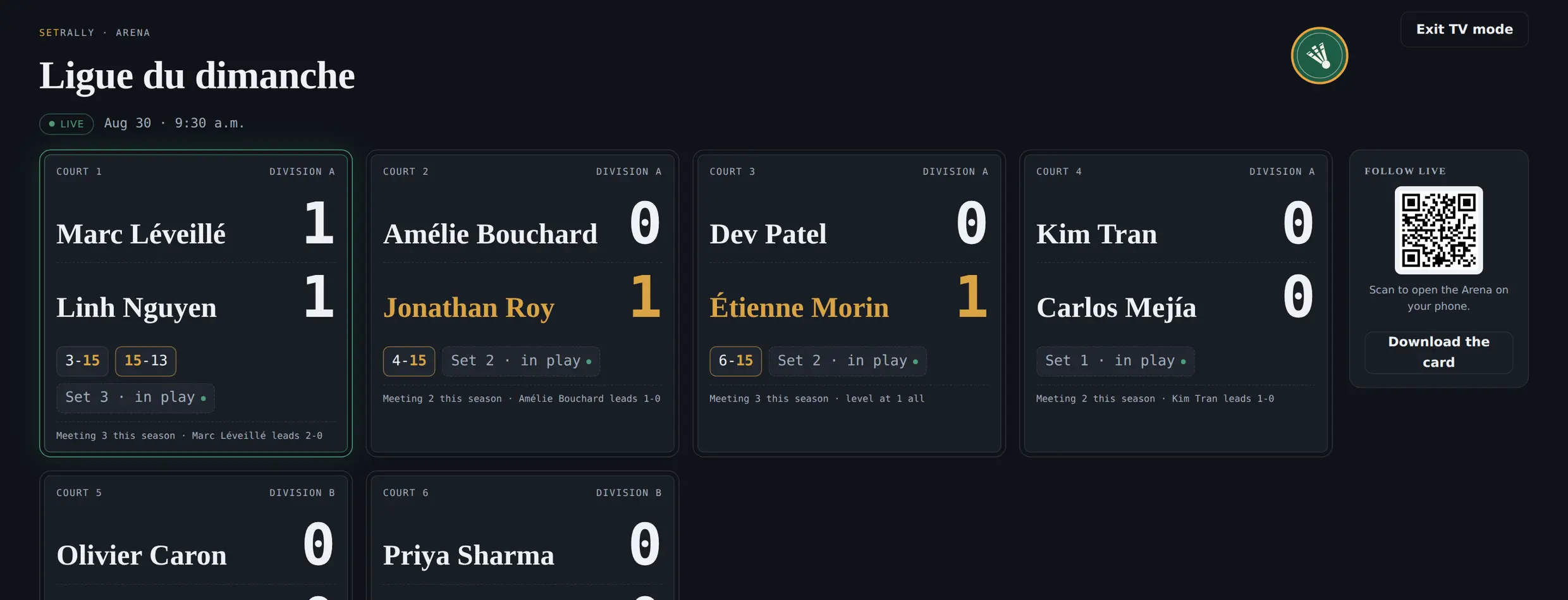
TV mode
A television or projector in the gym? TV mode takes the Arena full-screen, readable from the back of the hall. When a score lands, it takes over the screen for a beat — the whole gym sees the 21–15 as it locks.
Everything fits on one page, with no scrolling, on a 16:9 television and on a tablet on a stand alike: the club crest and the league title, the session and its start time, the time of day, then one card per court — names set as large as the card allows, each with their last score and tonight’s record. Below: the session pulse (rallies played, progress, arrivals, estimated finish), the session standings — a green dot marks whoever is on a court right now — and the bench, which says who is up next. Results scroll along a band at the bottom, and the note you wrote for the session opens that band.
Nothing rotates or cycles on a loop: the screen moves at two moments only — when a result lands, and when a pair is called to a court. The rest of the time it holds still, so a three-second glance always finds something stable. The exit becomes a discreet dot in the bottom-left corner; Esc works too.
“You’re up! Court 3”
No more shouting names over the rallies. A player opens the Arena, picks their team, and keeps the phone in their pocket: when their court frees up, a green banner tells them — with a chime and a buzz. The board becomes the room’s silent organizer.
The wall says it too, for anyone who never took their phone out. On an open night the court is not the players’ to pick: forming the pair is assigning it. The moment the Arena places a match, that court’s card lights up for a few seconds and its number glows. From the back of the hall you see a card has just brightened; walking over, you read the number — which is what a player looks for when their name has just been called, not their own name, which they already know.
Never both at once. A score that lands frees a court, which is reassigned straight away: the two pieces of news arrive together, and the call would otherwise play out behind the result’s full-screen moment with nobody seeing it. The gym sees who won first, then who is going on — the order an announcer would follow anyway.
The player page
Every player gets their own view of the session: today’s scores, their session points, their place in the queue, then — once their matches are done — their verdict for the night. It’s the page your players will check the most; it lives at the same links they already have, no account needed.
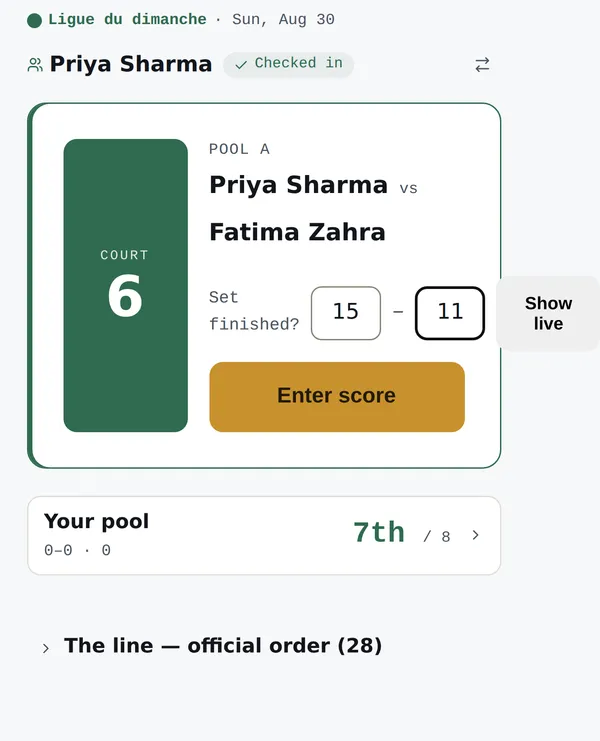
The score sheet this page opens also carries Declare a forfeit, for a match a player cannot finish. The rule is spelled out in the Game day chapter; the short version is one sentence: you only declare your own, and the match goes to your opponent. In a team league where captains sign the sheet, the page has no Confirm button: scores there are provisional, the encounter card says so, and the winner only shows once the sheet is official.
When the division leaves the order to the players, the card gives the whole evening at once: every opponent left, one line each, a Score button. The line on top invites them to agree and take a court, and right below it the division’s courts are named, the ones a match is on marked in use. The app only marks what it knows: in a division that runs its own order, the court is recorded when the score is entered — so a court already taken can still read as free, and a glance across the gym is what settles it.
The player photo card
The player page offers Make my card at two moments. The match card as soon as that match is played and confirmed — never to a qualifier still waiting on the bracket, since “your last match is played” would be false in front of a semi-finalist. The session card once the whole division has finished, not just the player: it carries the night’s standings, and standings that can still move are not a souvenir. The personal verdict shows as soon as the player is done — on the Pool tab as on Bracket.
Then: the player takes a photo — or picks one — and gets a story-sized image: their photo, their rank, their scoreline, the club crest. Two styles: the full card, or the transparent sticker to lay over their own photo in Instagram. Framing is done with the fingers: one finger moves the photo, two pinch it larger or smaller. Shrink it far enough and the whole photo sits inside the frame, and then it moves in every direction: the inked ground shows around it on the card, while the sticker stays transparent there. On a computer a slider replaces the pinch. A Remove the photo button goes back to the photo-free card — which is also what makes the transparent sticker available again.
Everything composes on the player’s phone — the photo never leaves the device, nothing is uploaded. It is held there for a quarter of an hour, so a trip through the camera cannot lose it, and the player can remove it whenever they like, which erases it from the device: SetRally keeps no copy, at any point. A borrowed phone does not pass it on either — it comes back only to the player who took it. And every card that lands in a story is your club’s name travelling exactly where your next players already are.
The same card exists as a video: under the preview, two tiles, Image and Video · 4 s. The clip runs four seconds, no sound — the finished card, then the photo alone, then the ink, the gold thread and the numbers settling back into place — and it ends on the card: that is the thumbnail the camera roll shows, and a Reel loops without a cut. It composes on the phone itself, the moment the tile is picked — the preview shows the assembly while the button fills up — and Share the video opens the same share sheet as the image. The tile only appears where the phone can produce an MP4 and hand it to Instagram; elsewhere, and for the transparent sticker, the image remains.
And the player’s own video: the Choose a photo or a video button opens the gallery, photos and clips side by side — on a phone, Take a photo stays next to it — and the card composes over their own footage — the same finger framing, the same rank, the same crest. Fifteen seconds at most: one rally end to end, and on a longer clip a Start slider picks where it begins. Composing starts on Compose the video, takes as long as the clip — the preview shows the assembly while the button fills up — and the clip is silent: a gym records other people’s voices too. The photo stays; Remove the video brings it back. A video the browser cannot read — HEVC or HDR footage, often — is refused with the reason, and the photo stays.
The card offers itself at the right moment: as soon as the player finishes their last match, before the bag is packed. Nothing for you to run — the invitation is on their page.