Set up your club
Create your account, your organization and your first event — the starting point, whether you run a club league or a one-Saturday tournament.
Create your account
Everything happens in the app, at app.setrally.com. You sign in with an email and password, with your Google account, or with a sign-in link sent to your inbox — your pick, and all three lead to the same account. Creating an account means accepting SetRally’s terms of use and privacy policy: a box to tick on the sign-up form. An account made with Google or a sign-in link accepts them on its first visit to the console, on a screen that sums up the essentials — the same screen comes back once when a new version of the terms is published. Your club keeps ownership of its data.
Self-serve sign-up opens soon. Until then, access takes a two-line email to [email protected] — tell us your club, your sport and your city.
Your account
The circle with your initials, top right of the console, opens your account page — yours, not the organization’s. On a phone it is the only way there; on a large screen, your email next to it leads there too.
- Your name and language. The name shows only in your console (the greeting, the initials in the circle): your players see your organization’s name. The language you pick here follows your account on every device — the FR/EN button in the bar does the same thing.
- How you sign in. The page states what is in place: a password (set or not), Google (linked or not) and the email sign-in link, always available. You can set or change your password there, and link or unlink your Google account — unlinking is refused only if, without it, you would have no way in.
- Forgot your password? On the sign-in screen, enter your email and tap Forgot your password?: the link you receive signs you in and opens this page right on the new-password form, without asking for the old one — for fifteen minutes. Google works the same way: sign in with it, then open this page within that time.
- Changing your sign-in address. Enter the new address and your password (or sign in again with a link or with Google first: the page accepts that for fifteen minutes): a confirmation link goes to the new inbox, good for fifteen minutes, and nothing changes until it is followed. The page shows the pending request, with a way to send it again or cancel it. Once the link is followed you sign in with the new address — same password, same Google account, same organizations — and the old address is told. An account without a password has to sign in again with a link or with Google first.
- Your other devices. A session left open on the front-desk tablet or the gym computer is closed from here, with one button — you stay signed in where you are. Changing your password does this too.
- Your organizations. The page lists the organizations you belong to, with your role in each — administrator or manager — and lets you leave one, unless you are its only administrator.
Create your organization
The organization is your club, your league, or simply your Thursday-night group. It carries two things:
- A name — the one your players will see everywhere: on the public page, in emails (“Your club via SetRally”), on player cards.
- A public address, short and permanent: app.setrally.com/your-club. It’s the link you’ll share the most.
One account can run several organizations, each with its own plan — up to three on the Free plan. While you only have one, signing in drops you straight into it, on your list of events: there is nothing to choose. From the second one on, you land on your list of organizations and open the one you want. To create another, go to Your account (your email, top right) then New organization.
Add your club crest as soon as you have it handy: a square image (PNG or SVG) is all it takes. It then shows on the public page, in the Arena and on the photo cards your players share — your logo travels, not ours.
Session, league, tournament, or team league?
An event wears one of four faces. The engine — pools, brackets, scoring — is the same everywhere; what changes is the rhythm, and the unit that counts:
- A session fits in one date: a few hours, a place, spots and a price. People sign up for that date only. A session is sold on its own; a league or a program is a set of sessions sold together. See Create a session, below.
- A league lives in sessions: recurring nights or mornings, attendance that varies, a season standing that builds week after week. That’s chapter 3.
- A tournament lives in one day: sign-ups, a draw, pools then a bracket, a champion. No sessions to manage.
- A team league pits clubs against each other in encounters — lineups, a calendar, substitutes. It has a chapter of its own: chapter 6.
One club can run both at once — the Sunday league and the season-end tournament are two events under the same organization. On the Free plan there is one active-event slot. When it is taken, the form says so as soon as you pick the format: for a tournament, its one button becomes Create and pay — $49 — the tournament is created à la carte as soon as Stripe confirms the payment, unlocked (no limit on divisions or players) and outside the slot; a second league needs the Club plan, or archiving the finished event that holds the slot. Details in the Settings chapter.
Create a session
Pick Session under New event: no further format question, just one form. At the top, a photo of the sport, drawn at random from the ones SetRally provides — Another photo offers a different one, and the one you keep stays on the session. Use your own image puts yours in its place (the night’s poster, the gym): it is shrunk in your browser before it is sent, without the phone’s data, and it shows on the session’s card and on its sign-up page, to everyone — no photos of people without their say-so. A repeated session shares the same image. Then the sport, the title (if there’s a level, it goes in there: “Free play B+/A”), the date, the start and end times — a line under the fields reads back what you typed (“Wednesday, October 7 · 7–9 p.m. · 2 hr”), and an end before the start means the next day. Then the location, as players will read it, the spots (empty: no limit; once full, the next people go on the waitlist) and the price: one amount per player, 0 for a free session — or, with Add a price, one price per role (Member, Non-member, Junior…), each with its own spots if needed, eight prices at most. The Description, optional, says what players should know before they come: the level, what to bring, how to get in. Its bar makes bold, italic, a heading, a list or a link, and Preview shows the text as the public page will; Markdown can be typed directly too. The form says how people will pay: online at sign-up if your club has Stripe, at the door otherwise — you then tick who paid at check-in.
Paid online, a session also says what happens if a player cancels: everything they paid comes back as credit with your group, if they cancel in time. You set one thing, the deadline: 24 hours before the start by default, 0 meaning right up to the start time. Before the deadline, a player who cancels is credited without you stepping in; after it, their spot opens up and nothing is given back. Credit gives back the full amount paid, toward their next sign-ups with you, and never expires; your group owes it, and if you leave SetRally, you refund any remaining credit yourself. After a cancellation, you can also refund the player to their card, one player at a time (chapter 2). A sentence under the deadline says what will happen (“A player who cancels before Sat, Oct 10, 7 p.m. is credited without you stepping in.”), and the rule shows on the session’s card and its sign-up page, before payment.
No address to type: it comes from the title and the date (/your-club/free-play-b-a-2026-10-07). Once created, the session goes on your public page right away — a card with its date tile, its hours, its place, its spots left and its price (“from $5” when a free price sits beside paid ones) —, sign-up is open and closes at the start time; people sign up one at a time, check-in is on, RSVP invitations are off. You then land on its page, the session’s only one: its link to share, the same form to change anything, and the list of who’s coming, which becomes the check-in on the day (chapter 3). A session does not take the Free plan’s active-event slot.
Repeat, the last question, is a checkbox: ticked, the session comes back every week, twice a week (you pick the other day) or every other week, until the date you give. The dates show before anything is created: tap one to skip it — a holiday, a closed week — and the button says how many it will make (“Create 11 sessions”). Each date becomes a session in its own right, with its card, its spots and its waitlist, all created at once or not at all. They remember being born together: on a session’s page, Save asks This session only or This one and the following — a new date shifts the following ones by the same number of days, and sessions already played or locked keep theirs.
Divisions and levels
A division crosses a discipline (singles, doubles, mixed doubles, or team play) with a level (A, B, C… — you pick the letters). “Men’s Singles A” and “Women’s Doubles B” are two divisions.
The level is more than a label: it’s the key to league points. Two divisions at the same level score exactly the same — Singles A and Doubles A feed the same scale. Scales are set per level in the settings (chapter 5).
“A” and “a” would be two distinct levels, with two scales. Reuse the existing levels the form offers rather than retyping one.
The console guides you
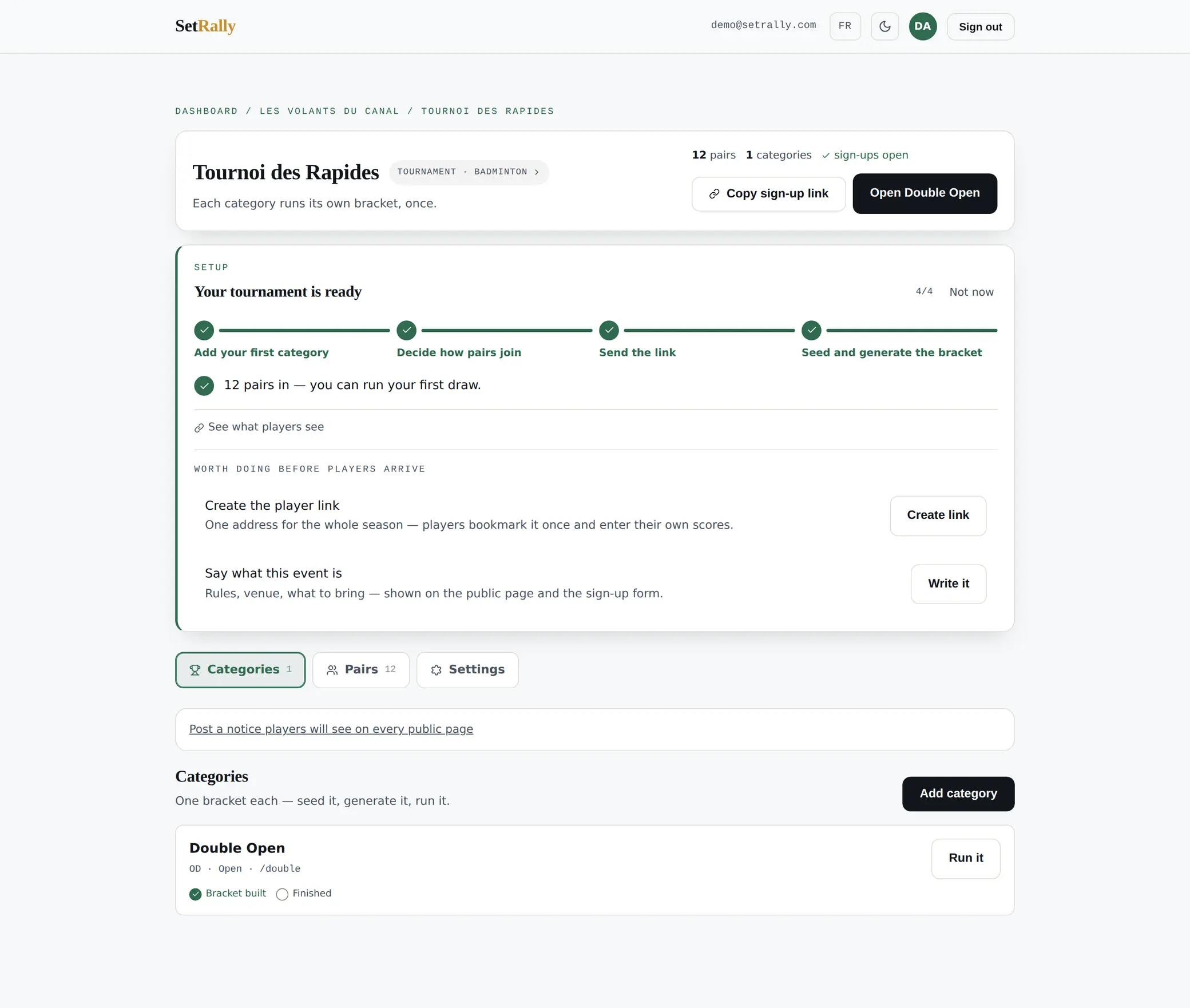
Once the event exists, its console shows the short list of steps left before everything runs: add divisions, pick a scoring format, open sign-ups. Each step checks itself off as it’s done — when the list is gone, you’re ready.
The settings, at a glance
An event’s console has three tabs: its Sessions (its Categories for a tournament), its entrants — Players, Pairs or Teams — and Settings. That last page reads by groups, each opened from its chip: Format, Sessions (RSVP, arrivals, automatic invites, courts), Scores (who confirms, when it locks), Team play, Divisions (their list and their mode) and Points — a league shows five, a tournament two. The fee and the spots live with the entrants, under the Setup chip of their tab. Every switch is explained, screenshot in hand, in chapter 7 — Every setting.
What your players see
Every event has its public page: app.setrally.com/your-club/your-event. Standings, brackets, sessions — all readable with no account and nothing to install. To sign up, a player signs in to their SetRally account, with no password: an email link, or Google. Everything else that’s theirs to do (pay their share, confirm attendance, enter a score) happens through a link they receive or scan, without signing in.