Running the session
The heart of a league: create the sessions, check people in, generate the night’s play, fill the courts — and let players enter their own scores.
A session sold on its own
A session created from New event (chapter 1) has one page in the console: no tabs, no setup assistant, and no scores to keep. From top to bottom:
- The header: the title, the date and hours, the place, then the Sign-up open switch, which acts at once and for this session only (at the start time sign-up closes and it stays off), and the count of sign-ups, of what is still unpaid and of the waitlist.
- The session link: the address of its public page, with Copy, Share (the phone’s own sharing, where it has one) and QR code for a poster at the gym.
- The session: the same fields as at creation (the image, the sport, the title, the date and hours, the place, the spots, the prices and, when paid online, the deadline before which a player who cancels is credited with you), the description, and the Terms to accept, folded, for a waiver. As soon as a field changes, an Unsaved changes bar appears, and Save publishes everything at once. For a repeated session, Save asks This session only or This one and the 2 after it, and recalls what is changing.
- Who’s coming: the people who have their spot — paid, or added by you — in the order they came, with their price and payment (“$15 due” in gold); theirs is the number counted against the spots. Without online payment, a sign-up has its spot as soon as it’s made, and is paid at the door. Those paying online, or offered a spot that opened up, are listed apart under Spots on hold: these spots aren’t counted yet, each person moves into the list once their payment is in, and if they don’t pay in time the spot opens up by itself. Then the waitlist, which serves itself (below), Add someone for a sign-up taken by hand, and the list as a CSV. Tapping a name opens their card: mark as paid or refunded, resend the payment link, cancel the sign-up (their spot frees up for the waitlist, and what was paid can go to their credit). When the person has credit with you, their card shows it, with Mark the credit as paid back. Under the list, Cancellations, folded, keeps track of who left: the player themselves or an organizer, on what date, and what happened to the money (“$14 as credit”, “$14 as credit to Sam Tremblay”, “$14 as credit, $14 of it refunded to the card on Oct 5”); each line opens the person’s card, with Refund to the card when a card paid (chapter 2). Each person shows under the name typed at sign-up; when their address already belongs to a player of the club, their card also shows the name on the club’s records.
The waitlist serves itself. A spot that frees up — a cancellation, a held spot not paid in time, spots you add — is offered by email to the first person on the list, who has 12 hours to pay, never past the start of the session; unpaid, the spot moves on to the next person. Someone with nothing to pay online gets it outright. There’s nothing for you to do: Give a spot is only for choosing yourself who takes it. A payment that arrives after the deadline, once the spot has gone, is refunded in full: the fees Stripe keeps on a refund are then yours, and SetRally’s commission comes back to you.
On the day of the session, Open check-in leads to the same list, now the check-in: names in alphabetical order, a circle to tap as each person arrives, and Collect for whoever pays at the door. A poster or an older link to check-in lands there too. At the foot of the page, Archive session and Delete session.
Its public page and its card say the date, the hours, the place, the price and the spots left, then the description; Share, beside Sign up, sends the link from a phone, or copies it. When the description runs longer than a screen, a second Sign up follows it, for whoever reads it to the end.
Create the sessions
A session can also be sold on its own: that is the Session event type, created from the dashboard with its date, hours, location and price (chapter 1). It is run from its own page, check-in included (above). What follows is about a league’s sessions.
New session asks for three things: the date, the start time — optional, but it is what drives the TV wall, the shared poster and the emails — and the number of courts (“4 courts”). Their real names (“Centre, Back”) are set once for the whole season, under Settings → Sessions, and follow through everywhere, all the way to the Arena.
For a whole season, Add recurring creates the sessions in one go: every week, every two weeks, twice a week… You adjust or delete the exceptions (holidays, closed gym) afterwards.
A date that moves is corrected in place: on the session’s row, the calendar icon opens Move the session — a new date, a new start time. Everything laid on it follows: the matches, a team league’s encounters, the courts. Two exceptions, and the icon is absent in both: a closed session (reopen it first) and one whose matches already carry a score — its date is then part of the record. The court count stays editable to the end.
The list puts what is left to do at the top: the next session first, then the ones after it. A past date you never closed keeps its place there — that is work, not history. Closed sessions fold away at the bottom under Finished sessions, most recent first; tap the line to open them again. At the end of a season, once nothing is open, the fold shows itself unfolded.
Invitations and attendance
Before the session, invite the group by email: the message carries two buttons — I’m in and Can’t make it — and the player answers in one tap, with no account. The button they press records the answer and opens the session page already showing it, where it can still be changed. The subject holds two things, because a lock screen shows no more: RSVP and the date. You watch the answers come in from the console — enough to know on Wednesday whether Sunday needs six courts or four.
On the day, you take arrivals: check people off from the console, or let players flag their own arrival from the session’s check-in page. Someone shows up unannounced? Add a walk-in player — pair or team, whichever your event fields — slots them into the running session, for tonight only. In a league whose divisions re-form each session you are not asked which one: it is settled when you build the session, like everyone else’s.
Only players who have arrived go into match generation. Taking arrivals isn’t paperwork — it’s what guarantees no match gets created for someone who stayed home.
Check in all checks in the players tonight expects — the yeses and the ones who never answered — not the whole season. Anyone who answered “can’t make it” stays out: out of the generation, and out of the session’s ranking, until you tick them in yourself. The button states the room: press it again and it also drops whoever pulled out in the meantime.
A player’s email
A drop-in belongs only to the session you add them to: they do not come back on the season's entrant list — they sit apart under Drop-ins — nor on later sessions, and they are never emailed an invite. Their results count like anyone else's. That does not make them a stranger next time: typing their name in Add a player without a reservation searches everyone the event has already met — regulars and earlier drop-ins — before offering to create a new name. Always pick the suggested name rather than confirming what you typed: that is what keeps their points on one record instead of opening a second one.
A team that pulls out drops down the list under the Out tag — and its row opens like any other: a forfeit announced on Tuesday and called off on Wednesday is undone by setting each player back to Yes, or to — to clear their reply and leave them pending.
An invite goes to the player’s own address. On the Roster page, expand a row and you will see that address under each name: click it to correct it, empty it to remove it. A player who has none says so in plain sight — add an email — and that is exactly why they are counted as “without an email” when invites go out.
One inbox belongs to one person: type an address another entrant already holds and SetRally names them instead of storing the same mailbox twice. The fallback address, further down the same row, is only used by players who have none of their own.
Accepting a stand-in
A player who says they can’t make it may name someone to take their spot. The team then appears under Needs your attention with the proposed name, and you decide: Take that stand-in, merge the team with another, or pull it from the session. Once the stand-in is taken, the team leaves the list — it is settled — and its row keeps the note “X is playing for Y tonight”, so that when you fill the courts you know who is actually playing and why the name changed. If the player changes their reply or names someone else, the question comes back to you.
What Take does next depends on what the entry is. In doubles the team stays itself: the partner is still there, the team keeps its place and its points, and it is simply renamed for the night. In singles the entry is the player: the stand-in is not a new partner, they are a different competitor. So SetRally enters them as a drop-in under their own name — and if they have played here before, they rejoin their own line in the standings instead of opening a second one. They check in at the door like everyone else, and the scores they enter carry their name. The absent player does not play: their row stays out of the night, noted “X is playing instead”, and earns nothing for an evening they did not play.
Let the invites go out on their own
Once the sessions exist, SetRally can send each session’s invite without you thinking about it: three days before, at 9 a.m. (or the lead and time you choose), on your club’s clock. You flip one switch, once, in the event settings under Ask who’s coming, and the whole season is covered — a weekly league gets a weekly invite, and a season with a break simply follows its own calendar. The automatic send goes out once per session; the buttons stay for a player added afterwards, or to chase those who haven’t replied.
In the settings, a sentence under the switch tells you exactly when the next invite goes out and for which session, then the one after — it updates as you change a setting, so you read the consequence before leaving the page. Language of the invites sits just above the switch, and covers every invite this event sends — the automatic ones and the ones you send by hand. It is the email’s language, not your console’s.
The Reminder field next to it adds a second email a few days later — one only, and only to the players who have not answered. Its subject starts with Reminder, so an inbox never shows the same line twice. The reminder always lands after the invite: the choices stop one day short of it, and moving the invite closer switches the reminder off rather than sending both at once. The Roster page names its date, then says when it went.
A word to your players, for one session
On a session’s Roster page, the This session’s invite card holds a A word to your players box: write what they need to know that day — a closed parking lot, a different door, a later start. The note saves itself as you type, goes into the invite email under the reply buttons, and shows on the page where each player answers — where an email address you write in it ([email protected]) becomes tappable, so a player can reach you without copying it out. Written after the email has gone, it won’t be in it — but it still appears on the reply page of everyone who taps their link, and the card tells you so.
You can add one image to it — a map of the gym, a poster: Add an image, or drag it into the box from a computer. It saves as soon as you pick it; Replace and Remove change it in one tap. It goes out in the email under your message and shows as a thumbnail on the reply page, where a tap enlarges it. Many inboxes hide images until the reader shows them, so say what it shows in words too.
This is not the event’s Public notice, which stays up as a banner on every public page until you clear it: the word to your players belongs to one session and travels only with its invite.
A word per division, week after week
On a session’s Setup page, each division has a word of its own too: Add a word, under its courts — “courts 5 to 8, free warm-up until 7 pm”, what this division’s players need to know as they arrive. It shows on their player page, under their name, and stays there week after week until you change or clear it. Each player can close it on their phone; a changed word comes back. Other divisions never see it.
Knowing where the invite stands
The same card always says one thing: when the invite goes out, or that it went and how many players received it. If some emails were held for tomorrow by the daily limit, it says so — nothing to redo, the rest goes out on its own. If it is your plan’s monthly email quota holding them, it says that too: those go out on the 1st, or as soon as the plan grows. On the Free plan the send button is grey — emailing starts with Club — and Prepare links stays there to copy them. If the planned moment passed with nothing sent (a session created the same day, say), it says that too, and Send now stays within reach.
Generate the night’s play
Each division picks its formula, session by session:
- Pools only — everyone plays, the night’s standings are the verdict.
- Pools → playoff — a pool phase, then the best cross into a bracket, all within the same session.
- Open night (swiss) — no structure up front: pairings form through the evening, each time a court frees up. Those who’ve played least go first, the longest-rested among them; the opponent is someone on the same number of games with the closest record, never a rematch while it can be helped — what players call swiss pairing, minus the pause between rounds. The first fill follows the season standings: 1st v 2nd, 3rd v 4th. The formula for relaxed club nights. It sits in the same menu as the pools, division by division, with a single setting: Games per player. Everyone plays that many and is then done for the night; the player page says so. SetRally suggests it from the turnout (never fewer than three), and you can change it mid-evening — courts still free at ten fill right away. The night’s standings count toward the season like a pool’s. A player unchecked at the door has their not-yet-started matches dropped, and their opponent is paired again at the next free court; a match already under way is never touched.
One button generates the matches from who’s there. Don’t like the result? Regenerate freely until a match has been played.
Once the night is built, it is the scheduled players who stop moving, not the session: their division is the one their matches were drawn from. Everyone else can still be placed — a drop-in who arrived after the draw, someone nobody had placed, a team whose division has not been generated yet. On the Setup board their cards keep their grip handle; the others lose it, and their ⇄ menu says why — “already scheduled tonight” — while still offering to take them out of the session. Seat the ones waiting puts all of them into the division the standings give them in one tap, without touching the teams already drawn. They land in a division that has no match for them, so regenerate that division to give them one, or add a match by hand.
Three things trade against each other: guaranteed games (does an early loser still play?), total time, and an undisputed winner. Pure knockout is shortest but sends half the room home after one match; pools alone get everyone playing without crowning anyone convincingly; pool + playoffs pays both — the safe bet for a group of 12 to 32. And for a no-stakes club night, the open night beats everything else.
Fill courts
Fill courts assigns waiting matches to free courts, oldest first, and never puts the same person on two courts. The queue shows who’s waiting and why — “Mireille is still on court 2” — so nobody has to come ask you. On the Play page, the Courts panel folds to one line when the app places nothing — a division where players choose, a team league — and the Matches list takes over below it: every match still to play carries its rank in the order of play and its own Score button.
Players enter their own scores
This is the feature that takes the pencil out of your hands. One Player link serves the whole season — shown as a QR code at the door or sent once to the group: everyone finds their own page on it, and on that page, their current match. The link lives in three places: Copy player link on the event card, the moment you open it; under Share in the entrants tab, with its QR code; and on each session’s Play page:
One side enters the score from their phone, in one go, at the end of the match. The sheet opens at the size of the format: one game under free scoring, two under the standard rule, and you add more if you need them.
The other side confirms: “Alex entered this. Is it right?” One tap, and the score locks, the standings update, the court frees up.
Disagreement? The match flips to Score disputed and waits for your ruling — you settle it from the Needs an answer strip at the top of the Play page, in thirty seconds.
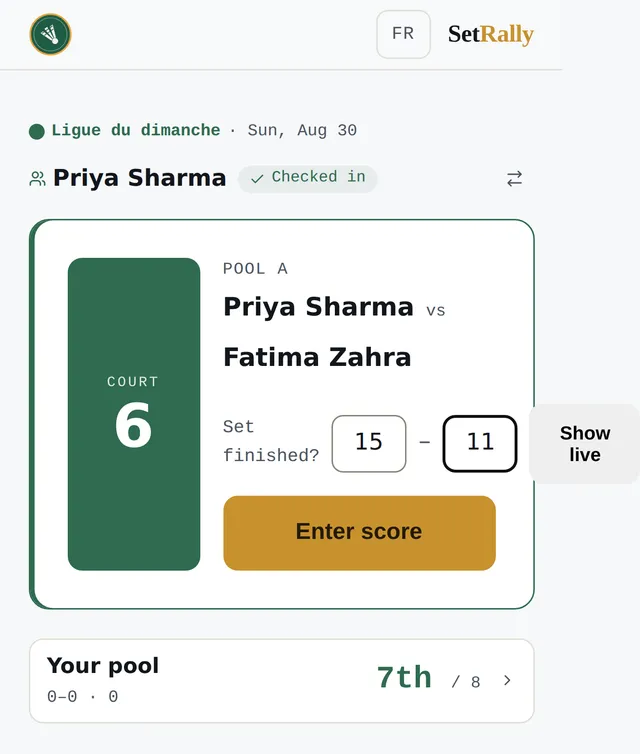
And a match that can't be finished? At the bottom of the sheet, Declare a forfeit hands the match to the opponent without playing it — a turned ankle, a partner stuck in traffic. It works in every format, not just team leagues. You only ever declare your own: the sheet never asks who wins, it knows who is speaking, and the match goes to the other side. With score confirmation on, the opponent confirms a forfeit exactly as they would a score; with it off, it is recorded straight away. After that, only you can correct it.
Above the scores, the sheet also asks which court you played on: the session's courts as buttons, the division's own block first where it has one. The question is optional — skipping it still records the score. It only appears when nobody has already put that match on a court, and on a night where players take whichever court frees up it is the only moment the app can learn where a match happened. What it does with it: the court shows beside the result, in the Arena's feed.
Confirmation itself is a setting (the Scores tab): mutual confirmation is the default behaviour, and you choose whether an unanswered score locks itself after a few minutes or stays open until confirmed. For a group that trusts itself, turn it off — the first score entered is final. In a team league you can also have it apply to the encounter: scores stay provisional and the two captains sign the sheet at the end.
And a player who got it wrong? That is a setting too (Scores tab, Players can fix a score): never — the default, a locked score only moves in your hands —, for a limited time after it locks, or until the session ends. When it is open, the player taps their score on their page and retypes the games; a walkover is fixed the same way, to the score that was actually played. The agreement rule follows confirmation: on, a fix is a proposal the opponent approves or refuses, and the recorded score does not move until then; off, it applies immediately. A refusal closes the match to further fixes, and you settle it from there. Whatever the setting, these stay fixed: a locked session or one whose day has passed, a score you entered or settled yourself, a bye, and — in pools followed by a bracket — every pool score once a bracket match is on a court, just like a bracket match whose next round has started. A fixed score keeps a “fixed” mark in the lists.
Scoring formats
The format says how many games and to how many points — “3 games to 15”, “2 to 21”, and so on. Set it once for the event, then refine where needed: a division that plays differently, playoffs longer than pool play, a shortened session because the gym closes at 9.
And if your group doesn’t want rules, free mode records scores exactly as players declare them, no validation — the standings compute the same.
Fixing a score
A locked score isn’t carved in stone: on the Play page, under Matches, Correct beneath the match reopens the sheet; correct it, lock it again. Under More live the walkover, the reset and, for a stray match, its removal. Standings, brackets and league points recompute themselves.
Approving an encounter sheet
When captains sign the sheet (team league, confirmed per encounter), the evening’s scores show up in the Matches section marked provisional, and each encounter’s header says where its sheet stands — “6 of 8 played”, “waiting for Longueuil to sign”, “signed by both clubs”. Unfold the encounter: the Sheet row under its matches says who signed and when, and carries Approve the sheet once every match has a score. While the sheet isn’t official, a score you change cancels the signature already given, and the score sheet says so before you save: “This change cancels Longueuil’s signature; they’ll have to sign again.” Approving makes the encounter official in the place of a captain who doesn’t sign; after that, captains can no longer change a score — you still can. Lock session also approves every complete sheet left unsigned, and its confirmation says how many.
Who put this score
Every score now has its journal: who entered it, when, and what was written before. On a session’s Play page, under Matches, More then History under a match opens the sheet — newest first, naming the organizer who fixed it from the console, the player the door checked in, or the club whose captain spoke; a link with no identity and the confirmation window are named for what they are. A match whose score was rewritten after the fact carries the word fixed beside its score. The journal starts the day it went live: scores entered before are not in it, and the sheet says so.